Brandon LeBeau
  • Educate-R
  • Publications
  • Presentations
  • R Packages
  • Workshops
  • About

On this page

    • Statistical Modeling
      • Explore interactions
    • Visualize Study Results
      • Interactive Visualization
    • Bonus: Mixed Model
      • Visualize Random Intercepts
    • Conlusions

World Bank Statistical Performance Indicators (TidyTuesday!)

Python
Tidy Tuesday
Visualization
Author

Brandon LeBeau

Published

November 24, 2025

This week Tidy Tuesday data are about Statistical Performance Indicators from the World Bank. The Statistical Performance Indicators evaluate how effectively countries produce, manage, and disseminate high-quality official statistics. The data are more prevalent from 2016 to 2023, so I filtered the data to restrict the range within that window. I also removed values that were labeled as “Not classified” from the income attribute. I fit a few linear models to see how overall scores changed over time, controlling for region and income level. Finally, I visualized the results with both static and interactive plots.

Code
import pandas as pd

import warnings

warnings.filterwarnings(
    "ignore",
    category=FutureWarning,
    message=".*observed=False is deprecated and will be changed to True.*",
)


import seaborn as sns
import matplotlib.pyplot as plt

spi_indicators = pd.read_csv('https://raw.githubusercontent.com/rfordatascience/tidytuesday/main/data/2025/2025-11-25/spi_indicators.csv')

spi_indicators['year_centered'] = spi_indicators['year'] - spi_indicators['year'].mean()

# Filter to 2016 or later, removes missing data
spi_indicators = spi_indicators[
    (spi_indicators['year'] >= 2016) &
    (spi_indicators['income'].notna()) &
    (spi_indicators['region'].notna()) &
    (spi_indicators['income'] != 'Not classified')
]

Statistical Modeling

My first model fits one that includes only the year (centered). The second model adds region and income level as predictors. The third model adds an interaction between region and income level. I’m interested in knowing whether the trend across years remains significant after controlling for region and income, and whether the interaction between region and income level is significant.

I’m using statsmodels for this analysis. The default behavior is to include an intercept, so categorical variables are converted to dummy variables with one level omitted as the reference group. The group closest to A in alphabetical order is treated as the reference group, for this analysis the reference group for region is “East Asia & Pacific” and for income level is “High income”.

The first model, with just year included, explained less than 5% of the total variance. The slope was 1.67, suggesting that on average, the overall score increased by 1.67 points per year.

Code
import statsmodels.api as sm
from patsy import dmatrices

y, X = dmatrices('overall_score ~ year_centered', data=spi_indicators, return_type='dataframe')

mod = sm.OLS(y, X)
res = mod.fit()
print(res.summary())
                            OLS Regression Results                            
==============================================================================
Dep. Variable:          overall_score   R-squared:                       0.048
Model:                            OLS   Adj. R-squared:                  0.047
Method:                 Least Squares   F-statistic:                     71.34
Date:                Mon, 24 Nov 2025   Prob (F-statistic):           7.35e-17
Time:                        13:34:21   Log-Likelihood:                -6031.2
No. Observations:                1417   AIC:                         1.207e+04
Df Residuals:                    1415   BIC:                         1.208e+04
Df Model:                           1                                         
Covariance Type:            nonrobust                                         
=================================================================================
                    coef    std err          t      P>|t|      [0.025      0.975]
---------------------------------------------------------------------------------
Intercept        54.8710      1.288     42.600      0.000      52.344      57.398
year_centered     1.6740      0.198      8.446      0.000       1.285       2.063
==============================================================================
Omnibus:                       91.317   Durbin-Watson:                   0.088
Prob(Omnibus):                  0.000   Jarque-Bera (JB):               48.058
Skew:                          -0.284   Prob(JB):                     3.67e-11
Kurtosis:                       2.300   Cond. No.                         18.8
==============================================================================

Notes:
[1] Standard Errors assume that the covariance matrix of the errors is correctly specified.

The second model, was more informative. The R-squared increased to 0.48, indicating that region and income level explain a substantial portion of the variance in overall scores. The slope for year stayed about the same at 1.68, suggesting that after accounting for region and income level, the average increase in overall score per year is similar in magnitude.

Code
import statsmodels.api as sm
from patsy import dmatrices

y, X = dmatrices('overall_score ~ region + income + year_centered', data=spi_indicators, return_type='dataframe')

mod = sm.OLS(y, X)
res = mod.fit()
print(res.summary())
                            OLS Regression Results                            
==============================================================================
Dep. Variable:          overall_score   R-squared:                       0.476
Model:                            OLS   Adj. R-squared:                  0.472
Method:                 Least Squares   F-statistic:                     127.8
Date:                Mon, 24 Nov 2025   Prob (F-statistic):          2.23e-189
Time:                        13:34:21   Log-Likelihood:                -5608.0
No. Observations:                1417   AIC:                         1.124e+04
Df Residuals:                    1406   BIC:                         1.130e+04
Df Model:                          10                                         
Covariance Type:            nonrobust                                         
========================================================================================================
                                           coef    std err          t      P>|t|      [0.025      0.975]
--------------------------------------------------------------------------------------------------------
Intercept                               59.6586      1.456     40.984      0.000      56.803      62.514
region[T.Europe & Central Asia]         14.0081      1.180     11.876      0.000      11.694      16.322
region[T.Latin America & Caribbean]     -0.4127      1.266     -0.326      0.744      -2.896       2.071
region[T.Middle East & North Africa]    -5.4869      1.336     -4.107      0.000      -8.107      -2.866
region[T.North America]                 19.4615      3.369      5.776      0.000      12.852      26.071
region[T.South Asia]                     5.1013      1.860      2.742      0.006       1.452       8.751
region[T.Sub-Saharan Africa]            -0.2839      1.267     -0.224      0.823      -2.768       2.201
income[T.Low income]                   -18.6400      1.505    -12.381      0.000     -21.593     -15.687
income[T.Lower middle income]          -12.7491      1.088    -11.723      0.000     -14.883     -10.616
income[T.Upper middle income]           -8.4157      0.943     -8.925      0.000     -10.265      -6.566
year_centered                            1.6825      0.148     11.398      0.000       1.393       1.972
==============================================================================
Omnibus:                      138.403   Durbin-Watson:                   0.725
Prob(Omnibus):                  0.000   Jarque-Bera (JB):              200.888
Skew:                          -0.738   Prob(JB):                     2.39e-44
Kurtosis:                       4.108   Cond. No.                         68.4
==============================================================================

Notes:
[1] Standard Errors assume that the covariance matrix of the errors is correctly specified.

Explore interactions

Here is where I explore a few interactions. First, I included an interaction between region and income. The R-squared increased to 0.56, suggesting that this interaction was useful in explaining additional variance in overall scores. The slope for year remained similar at 1.68. I’m not going to interpret all the coefficients here, but the interaction terms indicate how the effect of income level on overall score varies by region.

Code
import statsmodels.api as sm
from patsy import dmatrices

y, X = dmatrices('overall_score ~ region + income + region:income + year_centered', data=spi_indicators, return_type='dataframe')

mod = sm.OLS(y, X)
res = mod.fit()
print(res.summary())
                            OLS Regression Results                            
==============================================================================
Dep. Variable:          overall_score   R-squared:                       0.564
Model:                            OLS   Adj. R-squared:                  0.557
Method:                 Least Squares   F-statistic:                     85.90
Date:                Mon, 24 Nov 2025   Prob (F-statistic):          1.68e-233
Time:                        13:34:21   Log-Likelihood:                -5478.0
No. Observations:                1417   AIC:                         1.100e+04
Df Residuals:                    1395   BIC:                         1.112e+04
Df Model:                          21                                         
Covariance Type:            nonrobust                                         
======================================================================================================================================
                                                                         coef    std err          t      P>|t|      [0.025      0.975]
--------------------------------------------------------------------------------------------------------------------------------------
Intercept                                                             67.5434      1.863     36.256      0.000      63.889      71.198
region[T.Europe & Central Asia]                                        7.9974      1.805      4.430      0.000       4.456      11.539
region[T.Latin America & Caribbean]                                  -20.3607      2.247     -9.061      0.000     -24.769     -15.953
region[T.Middle East & North Africa]                                 -14.9367      2.199     -6.794      0.000     -19.250     -10.624
region[T.North America]                                               11.5422      3.345      3.451      0.001       4.980      18.104
region[T.South Asia]                                                  -0.8401      1.609     -0.522      0.602      -3.997       2.316
region[T.Sub-Saharan Africa]                                         -19.0491      4.699     -4.054      0.000     -28.267      -9.831
income[T.Low income]                                                 -15.3479      1.767     -8.687      0.000     -18.814     -11.882
income[T.Lower middle income]                                        -25.7328      2.035    -12.644      0.000     -29.725     -21.740
income[T.Upper middle income]                                        -14.9653      2.213     -6.761      0.000     -19.307     -10.623
region[T.Europe & Central Asia]:income[T.Low income]               -1.585e-14   3.59e-15     -4.420      0.000   -2.29e-14   -8.81e-15
region[T.Latin America & Caribbean]:income[T.Low income]            2.372e-14   3.34e-15      7.112      0.000    1.72e-14    3.03e-14
region[T.Middle East & North Africa]:income[T.Low income]            -15.2802      2.886     -5.294      0.000     -20.942      -9.618
region[T.North America]:income[T.Low income]                        2.877e-14   4.37e-15      6.590      0.000    2.02e-14    3.73e-14
region[T.South Asia]:income[T.Low income]                             -9.0788      3.044     -2.982      0.003     -15.051      -3.107
region[T.Sub-Saharan Africa]:income[T.Low income]                      9.0110      3.544      2.543      0.011       2.060      15.962
region[T.Europe & Central Asia]:income[T.Lower middle income]          4.3993      3.215      1.368      0.171      -1.907      10.706
region[T.Latin America & Caribbean]:income[T.Lower middle income]     22.1452      3.273      6.766      0.000      15.724      28.566
region[T.Middle East & North Africa]:income[T.Lower middle income]    25.9428      2.954      8.782      0.000      20.148      31.738
region[T.North America]:income[T.Lower middle income]               7.214e-16   3.99e-16      1.807      0.071   -6.17e-17     1.5e-15
region[T.South Asia]:income[T.Lower middle income]                    13.2352      2.139      6.189      0.000       9.040      17.430
region[T.Sub-Saharan Africa]:income[T.Lower middle income]            23.8118      4.945      4.816      0.000      14.112      33.512
region[T.Europe & Central Asia]:income[T.Upper middle income]          1.8278      2.580      0.709      0.479      -3.232       6.888
region[T.Latin America & Caribbean]:income[T.Upper middle income]     24.4680      2.872      8.520      0.000      18.834      30.102
region[T.Middle East & North Africa]:income[T.Upper middle income]    -2.1663      3.355     -0.646      0.519      -8.747       4.415
region[T.North America]:income[T.Upper middle income]                       0          0        nan        nan           0           0
region[T.South Asia]:income[T.Upper middle income]                    -4.9965      3.394     -1.472      0.141     -11.654       1.661
region[T.Sub-Saharan Africa]:income[T.Upper middle income]            13.8769      5.230      2.654      0.008       3.618      24.136
year_centered                                                          1.6883      0.135     12.481      0.000       1.423       1.954
==============================================================================
Omnibus:                      194.493   Durbin-Watson:                   0.872
Prob(Omnibus):                  0.000   Jarque-Bera (JB):              366.597
Skew:                          -0.851   Prob(JB):                     2.48e-80
Kurtosis:                       4.820   Cond. No.                     1.08e+16
==============================================================================

Notes:
[1] Standard Errors assume that the covariance matrix of the errors is correctly specified.
[2] The smallest eigenvalue is 5.29e-28. This might indicate that there are
strong multicollinearity problems or that the design matrix is singular.

The final interaction added was between region and year. This interaction proved to not be as useful as the first. Overall, the R-square was the same as the previous model. When looking at each interaction coefficient estimate between year and region, only one showed some signal, suggesting a stronger positive trend over time for the Middle East & North Africa region compared to the reference group (East Asia & Pacific). I decided to not include this interaction in my final evaluation and visualization of the study results.

Code
import statsmodels.api as sm
from patsy import dmatrices

y2, X2 = dmatrices('overall_score ~ region + income + region:income + year_centered + region:year_centered', data=spi_indicators, return_type='dataframe')

mod2 = sm.OLS(y2, X2)
res2 = mod2.fit()
print(res2.summary())
                            OLS Regression Results                            
==============================================================================
Dep. Variable:          overall_score   R-squared:                       0.566
Model:                            OLS   Adj. R-squared:                  0.558
Method:                 Least Squares   F-statistic:                     67.09
Date:                Mon, 24 Nov 2025   Prob (F-statistic):          3.05e-229
Time:                        13:34:21   Log-Likelihood:                -5474.6
No. Observations:                1417   AIC:                         1.101e+04
Df Residuals:                    1389   BIC:                         1.115e+04
Df Model:                          27                                         
Covariance Type:            nonrobust                                         
======================================================================================================================================
                                                                         coef    std err          t      P>|t|      [0.025      0.975]
--------------------------------------------------------------------------------------------------------------------------------------
Intercept                                                             70.2569      2.811     24.995      0.000      64.743      75.771
region[T.Europe & Central Asia]                                        5.5942      3.300      1.695      0.090      -0.879      12.067
region[T.Latin America & Caribbean]                                  -21.4521      3.860     -5.557      0.000     -29.025     -13.879
region[T.Middle East & North Africa]                                 -22.4724      3.964     -5.669      0.000     -30.249     -14.696
region[T.North America]                                               12.6779      8.628      1.469      0.142      -4.248      29.604
region[T.South Asia]                                                  -4.1817      3.605     -1.160      0.246     -11.254       2.890
region[T.Sub-Saharan Africa]                                         -22.1743      5.510     -4.024      0.000     -32.983     -11.365
income[T.Low income]                                                 -15.7193      1.793     -8.769      0.000     -19.236     -12.203
income[T.Lower middle income]                                        -25.9026      2.039    -12.704      0.000     -29.902     -21.903
income[T.Upper middle income]                                        -15.0555      2.214     -6.800      0.000     -19.399     -10.712
region[T.Europe & Central Asia]:income[T.Low income]                3.131e-15   1.86e-15      1.687      0.092    -5.1e-16    6.77e-15
region[T.Latin America & Caribbean]:income[T.Low income]           -1.968e-14   5.71e-15     -3.445      0.001   -3.09e-14   -8.47e-15
region[T.Middle East & North Africa]:income[T.Low income]            -15.0963      2.902     -5.202      0.000     -20.789      -9.403
region[T.North America]:income[T.Low income]                       -7.885e-15   2.63e-15     -2.999      0.003    -1.3e-14   -2.73e-15
region[T.South Asia]:income[T.Low income]                            -10.0318      3.177     -3.157      0.002     -16.264      -3.799
region[T.Sub-Saharan Africa]:income[T.Low income]                      9.4089      3.557      2.645      0.008       2.432      16.386
region[T.Europe & Central Asia]:income[T.Lower middle income]          4.5672      3.217      1.420      0.156      -1.743      10.878
region[T.Latin America & Caribbean]:income[T.Lower middle income]     22.2186      3.278      6.778      0.000      15.788      28.649
region[T.Middle East & North Africa]:income[T.Lower middle income]    26.0615      2.956      8.816      0.000      20.262      31.861
region[T.North America]:income[T.Lower middle income]               8.824e-16   2.64e-15      0.335      0.738   -4.29e-15    6.05e-15
region[T.South Asia]:income[T.Lower middle income]                    12.0807      2.424      4.983      0.000       7.325      16.836
region[T.Sub-Saharan Africa]:income[T.Lower middle income]            24.0133      4.947      4.854      0.000      14.308      33.718
region[T.Europe & Central Asia]:income[T.Upper middle income]          1.9161      2.580      0.743      0.458      -3.145       6.977
region[T.Latin America & Caribbean]:income[T.Upper middle income]     24.4884      2.874      8.521      0.000      18.851      30.126
region[T.Middle East & North Africa]:income[T.Upper middle income]    -2.0761      3.355     -0.619      0.536      -8.657       4.505
region[T.North America]:income[T.Upper middle income]               1.251e-14   2.07e-15      6.055      0.000    8.46e-15    1.66e-14
region[T.South Asia]:income[T.Upper middle income]                    -6.2306      3.591     -1.735      0.083     -13.274       0.813
region[T.Sub-Saharan Africa]:income[T.Upper middle income]            13.9873      5.230      2.675      0.008       3.729      24.246
year_centered                                                          1.2669      0.354      3.581      0.000       0.573       1.961
region[T.Europe & Central Asia]:year_centered                          0.3700      0.438      0.844      0.399      -0.490       1.230
region[T.Latin America & Caribbean]:year_centered                      0.1671      0.490      0.341      0.733      -0.794       1.128
region[T.Middle East & North Africa]:year_centered                     1.2251      0.532      2.301      0.022       0.181       2.269
region[T.North America]:year_centered                                 -0.2202      1.319     -0.167      0.867      -2.807       2.366
region[T.South Asia]:year_centered                                     0.7468      0.727      1.027      0.304      -0.679       2.173
region[T.Sub-Saharan Africa]:year_centered                             0.4847      0.446      1.088      0.277      -0.389       1.359
==============================================================================
Omnibus:                      194.106   Durbin-Watson:                   0.880
Prob(Omnibus):                  0.000   Jarque-Bera (JB):              370.934
Skew:                          -0.845   Prob(JB):                     2.84e-81
Kurtosis:                       4.852   Cond. No.                     1.08e+16
==============================================================================

Notes:
[1] Standard Errors assume that the covariance matrix of the errors is correctly specified.
[2] The smallest eigenvalue is 6.21e-28. This might indicate that there are
strong multicollinearity problems or that the design matrix is singular.

Visualize Study Results

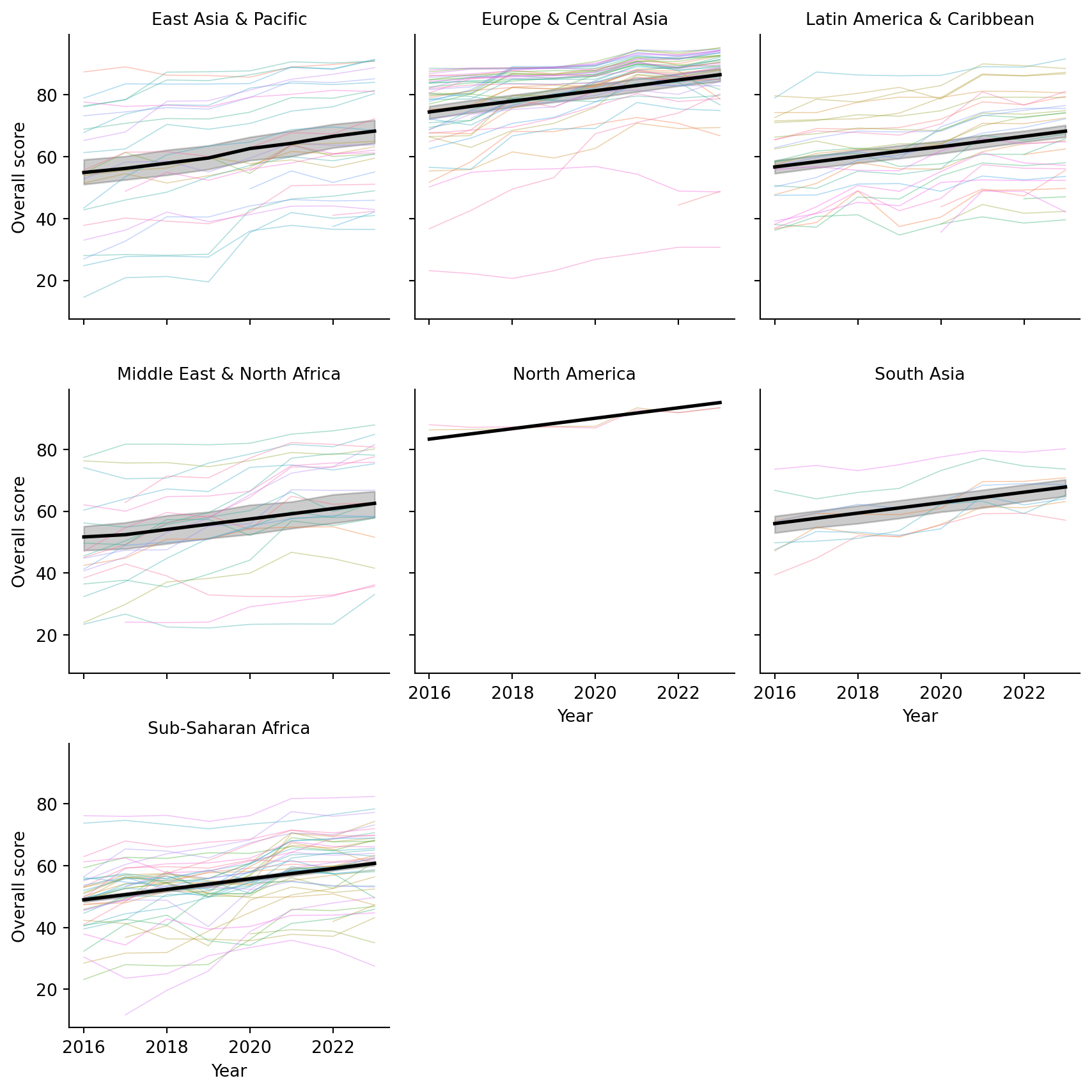
I chose to use the model with an interaction between region and income and a single pooled year trend for the final model to visualize. The following figure uses seaborn to create facets for each region. Thinner lines are shown for each country within the region, while a thicker black line shows the overall trend predicted by the regression model. The slope for each facet is assumed to be the same in this scenario, with differences in location based on the region that they are in. Differences in income are not directly shown here. Overall, we can see that some regions have higher overall scores than others, but the trend over time is generally positive across all regions. Furthermore, the fit for different regions varies, with some regions showing a tighter clustering of country-level scores around the predicted trend line, but many having variation across this trend line.

Code
import seaborn as sns
import matplotlib.pyplot as plt


# Make sure 'region' and 'country' are categorical
spi_indicators['region'] = spi_indicators['region'].astype('category')
spi_indicators['country'] = spi_indicators['country'].astype('category')

spi_indicators["pred"] = res.predict(X)


# Facet by region
g = sns.FacetGrid(
    spi_indicators,
    col="region", col_wrap=3,
    height=3, sharey=True
)

# --- country-level raw data (one line per country, per region) ---
def country_lines(data, **kwargs):
    sns.lineplot(
        data=data,
        x="year", y="overall_score",
        hue="country",
        units="country",     # one line per country
        estimator=None,      # no aggregation
        lw=0.6, alpha=0.4,
        legend=False,        # avoid enormous legend
        **kwargs
    )

g.map_dataframe(country_lines)

# --- region-level prediction line ---
g.map_dataframe(
    sns.lineplot,
    x="year", y="pred",
    color="black", lw=2
)

# Formatting
g.set_axis_labels("Year", "Overall score")
g.set_titles(col_template="{col_name}")
plt.tight_layout()
plt.show()

Interactive Visualization

Here is an interactive version that shows the average region trend and each country as a line showing their trajectory. You should be able to hover over this to see each country.

Code
import plotly.graph_objects as go
from plotly.subplots import make_subplots
import numpy as np
import math

spi_indicators["pred"] = res.predict(X)

regions = sorted(spi_indicators["region"].unique())

# Layout for facets
ncols = 3
nrows = math.ceil(len(regions) / ncols)

fig = make_subplots(
    rows=nrows,
    cols=ncols,
    shared_xaxes=True,
    shared_yaxes=True,
    subplot_titles=regions
)

# Helper to map index -> subplot row/col
def idx_to_rowcol(idx, ncols):
    row = idx // ncols + 1
    col = idx % ncols + 1
    return row, col

for i, region in enumerate(regions):
    row, col = idx_to_rowcol(i, ncols)
    df_reg = spi_indicators[spi_indicators["region"] == region].copy()

    # --- country-level raw lines ---
    for country, df_country in df_reg.groupby("country"):
        fig.add_trace(
            go.Scatter(
                x=df_country["year"],
                y=df_country["overall_score"],
                mode="lines",
                line=dict(width=1),
                name=country,
                hovertemplate=(
                    "Region: %{customdata[0]}<br>" +
                    "Country: %{customdata[1]}<br>" +
                    "Year: %{x}<br>" +
                    "Score: %{y:.2f}<extra></extra>"
                ),
                customdata=np.stack([
                    df_country["region"],
                    df_country["country"]
                ], axis=-1),
                showlegend=False  # avoid huge legend
            ),
            row=row,
            col=col
        )

    df_pred = (
        df_reg[["year", "pred"]]
        .groupby("year", as_index=False)["pred"]
        .mean()
        .sort_values("year")
    )

    fig.add_trace(
        go.Scatter(
            x=df_pred["year"],
            y=df_pred["pred"],
            mode="lines",
            line=dict(width=5, color="black"),
            name=f"{region} regression",
            hovertemplate=(
                "Region: " + region + "<br>" +
                "Year: %{x}<br>" +
                "Predicted score: %{y:.2f}<extra></extra>"
            ),
            showlegend=False
        ),
        row=row,
        col=col
    )

# --- Layout: white background, gridlines, labels ---
fig.update_layout(
    title="Overall score over time by region and country",
    plot_bgcolor="white",
    paper_bgcolor="white",
    height=400 * nrows,
)

fig.update_xaxes(
    title_text="Year",
    showgrid=True,
    gridcolor="lightgray"
)
fig.update_yaxes(
    title_text="Overall score",
    showgrid=True,
    gridcolor="lightgray"
)

fig.show()

Bonus: Mixed Model

Finally, before I ignored the correlation due to each country, just using ordinary least squares. At the end here, I consider a final mixed model that includes a random intercept for each country to help account for some of the correlation. Note, I do not include a random slope for time, but this is something that you could definitely do here. The assumption with the random intercept only model is that the countries only differ from their starting point, but have the same trend. Including a random slope for year would relax this assumption to allow countries to have a different starting place and also a different slope. I made sure to remove any missing data and also removed the interaction between region and income attributes as there was a combination that was not present in the data. I didn’t want to fiddle with the design matrix to specify. Also, because year is centered, the random intercept represents each country’s deviation from the expected overall score at the mean year (approximately 2019).

Model results show the random intercept having a large variance, suggesting that there is substantial variability in overall scores across countries that is not explained by the fixed effects alone. The fixed effect for year remains positive and is larger than before, almost 2, indicating that even after accounting for country-level variability, there is still a positive trend in overall scores over time.

Code
import statsmodels.formula.api as smf
from statsmodels.tools.sm_exceptions import ConvergenceWarning

cols = ["overall_score", "region", "income", "year_centered", "country"]

spi_clean = (
    spi_indicators
    .dropna(subset=cols)
    .copy()
    .reset_index(drop=True)   # avoid weird index issues
)

md = smf.mixedlm(
    "overall_score ~ region + income + year_centered",
    data=spi_clean,
    groups="country"          # <<< key change
)
mdf = md.fit(method=["lbfgs"])
print(mdf.summary())
                      Mixed Linear Model Regression Results
=================================================================================
Model:                    MixedLM        Dependent Variable:        overall_score
No. Observations:         1417           Method:                    REML         
No. Groups:               186            Scale:                     13.5437      
Min. group size:          2              Log-Likelihood:            -4258.0805   
Max. group size:          8              Converged:                 Yes          
Mean group size:          7.6                                                    
---------------------------------------------------------------------------------
                                      Coef.  Std.Err.   z    P>|z|  [0.025 0.975]
---------------------------------------------------------------------------------
Intercept                             54.084    3.091 17.498 0.000  48.026 60.142
region[T.Europe & Central Asia]       16.643    3.308  5.031 0.000  10.159 23.128
region[T.Latin America & Caribbean]    0.209    3.527  0.059 0.953  -6.704  7.123
region[T.Middle East & North Africa]  -3.026    3.826 -0.791 0.429 -10.525  4.473
region[T.North America]               23.330    9.864  2.365 0.018   3.997 42.664
region[T.South Asia]                   6.390    5.439  1.175 0.240  -4.270 17.049
region[T.Sub-Saharan Africa]           0.719    3.628  0.198 0.843  -6.392  7.830
income[T.Low income]                 -16.514    4.318 -3.825 0.000 -24.977 -8.051
income[T.Lower middle income]         -9.902    3.109 -3.184 0.001 -15.996 -3.807
income[T.Upper middle income]         -6.984    2.673 -2.613 0.009 -12.222 -1.746
year_centered                          1.967    0.043 45.376 0.000   1.882  2.052
country Var                          173.972    5.466                            
=================================================================================

Visualize Random Intercepts

Here is a visualization of the random intercepts from the mixed models as an interactive plotly figure. Larger random intercepts suggest that the country was further above the average trend line for each region, smaller random intercepts suggest that this country was further below the average trend line for each region. You can hover over each line to see each country name and their random effect predicted value.

Code
# Extract random intercepts for each country
re = mdf.random_effects  # dict: {country: Series}
re_df = (
    pd.DataFrame({
        "country": k,
        "rand_intercept": v.iloc[0]
    } for k, v in re.items())
    .sort_values("rand_intercept")    # order by random effect
    .reset_index(drop=True)
)
re_df["y"] = re_df.index

import plotly.graph_objects as go
import numpy as np

# numeric index for vertical position
re_df["y"] = re_df.index

fig = go.Figure()

# --- horizontal lines from 0 to effect (like your matplotlib version) ---
for _, row in re_df.iterrows():
    fig.add_trace(
        go.Scatter(
            x=[0, row["rand_intercept"]],
            y=[row["y"], row["y"]],
            mode="lines",
            line=dict(width=1, color="steelblue"),
            hoverinfo="skip",
            showlegend=False,
        )
    )

# --- points at the end of each line with hover showing country ---
fig.add_trace(
    go.Scatter(
        x=re_df["rand_intercept"],
        y=re_df["y"],
        mode="markers",
        marker=dict(size=6, color="steelblue"),
        customdata=re_df[["country"]],
        hovertemplate=(
            "Country: %{customdata[0]}<br>"
            "Random intercept: %{x:.2f}<extra></extra>"
        ),
        showlegend=False,
    )
)

# vertical line at 0
fig.add_vline(
    x=0,
    line_width=1,
    line_dash="dash",
    line_color="black"
)

fig.update_layout(
    title="Country random effects from mixed model",
    xaxis_title="Random intercept (country effect)",
    yaxis_title="",
    plot_bgcolor="white",
    paper_bgcolor="white",
    height=600,
)

fig.update_yaxes(showticklabels=False, showgrid=False, zeroline=False)
fig.update_xaxes(showgrid=True, gridcolor="lightgray")

fig.show()

Conlusions

Putting everything together, the SPI data tell a fairly optimistic story: statistical performance has improved steadily across the globe over the past decade, and the trend holds even after adjusting for region and income. At the same time, the mixed-model results reveal that countries still differ quite a bit in where they sit relative to that trend line. Some are consistently above expectations, others well below, and many move in surprising ways over time. The plots, both static and interactive, make these patterns easier to explore and show how much detail gets lost in average trends alone. It’s a nice reminder that even simple models can provide meaningful insights when paired with thoughtful visualization.
 

Brandon LeBeau